

EN | DE | ZH | FR | VI | ES
5cut app icon

5cut

Record lectures. Trim silence. Export study notes.

100% on-device No account Study-ready exports
Download 5cut on the App Store
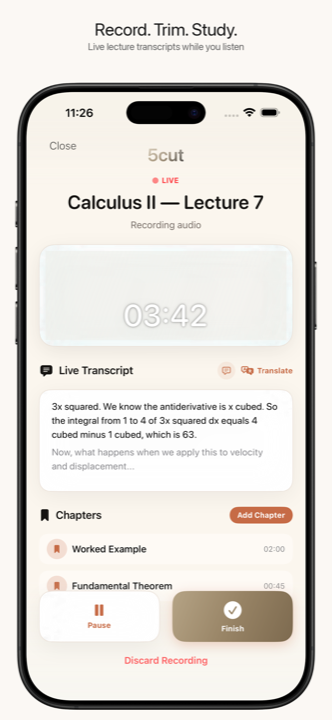
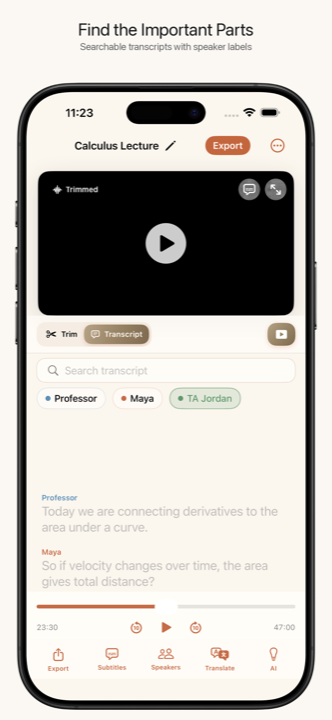
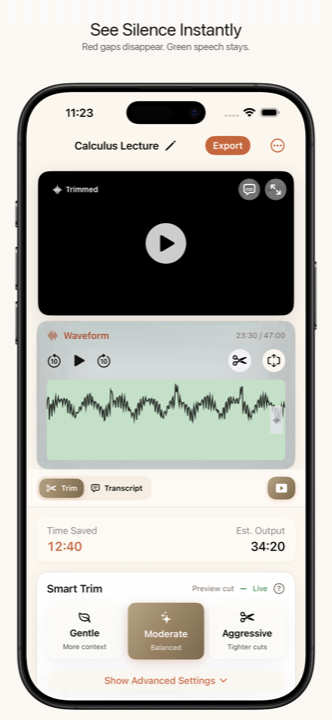
5cut recorder screen 5cut silence trimming editor 5cut transcript screen

30m+ saved per 90m lecture. Record, trim, transcribe, and export notes without uploading your audio.

Privacy First: 100% On-Device

We believe your recordings are yours. 5cut processes all audio, transcription, and AI summaries entirely on your iPhone or iPad. No audio or video is ever uploaded to a server, ensuring absolute privacy and compliance for students and professionals.

In-App Recorder & Bookmarks

Record lectures, meetings, and interviews directly in the app. Add chapter bookmarks while recording. Live transcript generated on iOS 26+ devices.

Automatic Silence Removal

Detect and cut dead air from lectures and podcasts. Use Smart Mode presets (Gentle, Moderate, Aggressive) or fine-tune the decibel threshold manually.

On-Device Transcription & AI Summaries

Generate captions in 30+ languages. Get AI summaries, key points, and Q&A powered by Apple Foundation Models. All processed locally on your iPhone — no cloud uploads.

Export to Apple Notes, Anki & Notion

Export a clean transcript with speaker labels and chapter markers directly to your favorite study tools, including Obsidian and auto-generated Anki cloze flashcards.

Speaker Identification

Automatically identify up to 4 speakers in a single recording. Color-coded and renamable labels — perfect for seminars and group discussions.

How it works

1

Record or Import a lecture directly in-app or from Files

2

See the waveform — green is speech, red is silence

3

Adjust the threshold or pick a Smart Mode preset

4

Export. Done. Silence removed, study notes generated.

Perfect for

Students reviewing recorded lectures in a foreign language — whether you are studying abroad or taking online courses. Expats watching local news, and professionals dealing with Zoom recordings with awkward pauses or podcasts.

Need subtitles? 5cut can also transcribe lectures in 30+ languages directly on your device.

Download 5cut on the App Store

Frequently asked questions

How does silence detection work?

5cut analyzes the audio waveform of your video on-device. Segments below the silence threshold are color-coded red. You can drag a slider to adjust what counts as "silence," or use one of three Smart Mode presets.

Can I add subtitles to foreign language lectures?

Yes. 5cut includes on-device transcription supporting over 30 languages. You can burn subtitles directly into the video or export them as an SRT file. Everything is processed on your device.

Does it work with Zoom and online course recordings?

Yes. Import any MP4, MOV, or HEVC video. 5cut works with Zoom recordings, Microsoft Teams meetings, screen recordings, and any video file with an audio track.

Can I process a whole semester of lectures at once?

Yes. You can queue up multiple recordings and process them with individual or shared settings.

Is my data private?

Completely. All processing — silence detection, transcription, speaker identification — happens entirely on your device. No cloud uploads, no accounts, no data collection. Your videos never leave your phone.

What does 5cut include?

5cut includes recording and import, silence removal, transcripts, subtitles, speaker labels, batch workflows, and study exports to Apple Notes, Anki, Notion, and Obsidian. Current pricing is shown in the App Store.

What languages is the app available in?

The app interface is available in English, German, Spanish, French, Italian, Japanese, Korean, Portuguese (Brazil), Vietnamese, and Simplified Chinese.